Key Takeaways — brief reading, less than 30 seconds
- Every question asked twice on a project is a brief field that was missing. Mandatories, out-of-scope, open questions, and definition of done are the four most templates skip — and where the asks-twice come from.
- Name one approver per review round, not "the marketing team" or "stakeholders." Reviewers send input to the approver before the meeting; the approver delivers one consolidated set of feedback to the designer.
- Channels determine specs. List every surface the work has to land on — IG feed, IG Story, LinkedIn carousel, email, print — in the brief. Discovering a missing channel at handoff turns one shoot into two.
- The brief, the references, the rounds, and the final files should all be reachable from one URL. If finding the brief takes three apps, the team stops opening it and the next question goes back into Slack.
Glossary12 terms
- Creative brief: A short document — usually one to two pages — that turns a creative request into a piece of work. Defines what gets made, who it is for, what success looks like, and how anyone will know when it is finished.
- Briefing: The kickoff meeting where the brief is walked through with the creative team. The brief is the document; the briefing is the conversation. Both should happen.
- Brand kit: The single source of truth for logo lockups, colour palette, typefaces, voice and tone rules. Lives in one place; the brief links to it instead of pasting it inline.
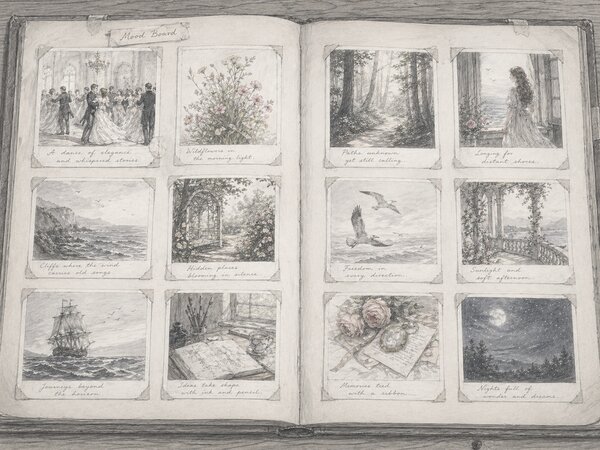
- Mood board: A curated set of reference images that signals the visual direction. Each image gets a one-line caption explaining what about it should carry into the work.
- “Don’t” gallery: Past creative work that was rejected, with the reason written next to it. Saves the new designer from rebuilding a treatment that already failed.
- Single-minded proposition: The one sentence the audience should walk away believing. Agency term for what a non-agency would call “the message.” Pick a name and use it consistently.
- Mandatories: Items that must appear in the work — legal lines, logo lockups, accessibility requirements, the call to action verbatim. The negative list (mandatory NOT) is just as important.
- Out of scope: The explicit list of what this brief is not asking for. Turns the next change request into a pointer at the brief and a one-line answer: change order.
- Definition of done: The line that says how both sides will know the work is finished. Files in which formats, named how, uploaded where, signed off by whom. Skipped on most templates; non-negotiable on this one.
- Change order: A documented expansion of scope, with a separate quote, signed off by the approver before work resumes. Triggered by anything past the agreed revision rounds or outside the deliverable list.
- Full / Repeat / Edit brief: Three sizes of brief, picked by how much the creative team has to invent. Full = a campaign or new concept, every field filled in. Repeat = follow-up work in an existing template, inherits campaign-level fields. Edit = a one-off change request, four lines. Adobe calls the same idea Tier 1, Tier 2, Tier 3.
- Approver: The single named person whose sign-off closes a review round. Reviewers feed input to the approver; the approver delivers one consolidated decision to the creative team.
The first creative brief I ever wrote was a Slack message. It said “hero banner for the spring landing page, something punchy.” The designer came back with three concepts. None of them fit, because I had not mentioned the page was already built and the banner had to land in a 1200×400 slot above the fold.
That is the failure mode this article is about: the question that gets asked twice because it was not in the brief the first time. Round one, the designer asks the dimensions. Round two, legal flags a missing disclaimer. Round three, the VP of marketing changes the call to action. Each rewrite was a question that should have been answered before the file was opened.
The template below is what I use now. Twelve to sixteen fields depending on the size, four sections most templates I have read leave out, and downloadable PDF and DOCX versions at the bottom so you can fill one in without retyping the structure.

Why Briefs Get Asked Twice#
A creative brief is the document that turns a request into a piece of work. It tells the creative team what to make, who it is for, and how anyone will know when it is done. When a brief works, the designer opens the file once, the stakeholder reviews against the same expectation the designer built to, and revision round three never happens.
Every question that gets asked twice on a creative project is a section the brief should have had. The list is short.
What Belongs in a Creative Brief#
The creative brief template breaks into sixteen fields. Twelve of them appear on most brief templates. Four — mandatories, out-of-scope, open questions, and definition of done — usually do not, which is why the same questions keep coming back at round two.
Not every field is needed on every project. Three sizes, depending on how much the creative team has to invent:
- Full brief — a campaign or new concept. Every field gets filled in.
- Repeat brief — follow-up work in an existing template (a new landing page, a quarterly banner refresh, a fresh email in an established layout). Inherits the campaign-level fields, keeps the rest.
- Edit brief — a one-off change request (swap a date, re-cut an aspect ratio, update a footer year). Four lines, no ceremony.
The three-depths idea is from Adobe’s creative brief guide(opens in new tab), where they call them Tier 1, Tier 2, Tier 3. The names and the field-by-field call on what drops at each size are mine, and that is what the table below answers.
| Field | Full | Repeat | Edit | Owner |
|---|---|---|---|---|
| Project name + summary | Yes | Yes | Yes | Brief author |
| Background + objective | Yes | Inherit? | No | Marketing lead |
| Audience | Yes | Inherit | No | Marketing lead |
| Single message | Yes | Inherit | No | Brand lead |
| Tone of voice | Yes | Inherit | No | Brand lead |
| Mandatory copy | Yes | Yes | No? | Brand / Legal |
| Mandatory NOT | Yes | Yes | No? | Brand / Legal |
| Deliverables + specs | Yes | Yes | Yes | Producer |
| Channels | Yes | Yes | Inherit? | Marketing lead |
| References + brand kit | Yes | Link? | Link | Brand lead |
| Out of scope | Yes | Yes | No | Brief author |
| Timeline + rounds | Yes | Yes | Yes | Producer |
| Named approver per round | Yes | Yes | Yes | Producer |
| Budget + change-order line | Yes | Yes | No? | Producer |
| Success metrics / KPIs | Yes | Inherit | No | Marketing lead |
| Definition of done | Yes | Yes | Yes | Producer |
| Open questions | Yes | Yes | No? | Brief author |
Project, Objective, Audience#
- Required on every brief
- Owner: Marketing lead
- One paragraph each
The project field is one paragraph. Project name, the surface it ships on, the campaign it belongs to, and the date the brief is sent. It exists so anyone landing in the file three months later knows what they are looking at without opening Asana.
Objective is the line everyone fights over and most briefs get wrong. “Make a banner” is the deliverable, not the objective. Write down the change you need in the business — demo signups up by two hundred, homepage demo click-through from 1.4% to 2.0%, churn down a point next quarter. Without that outcome, the creative team has no way to make trade-off calls; they default to making it look nice, which is a different goal and produces a different file.
The audience field is two sentences and a context line, not a demographic dump. A marketing ops manager scrolling LinkedIn at 9pm is a different audience than a retail buyer browsing a wholesale catalog at a desk. The brief should say what they already know about you, what you want them to feel, and what one action you want them to take after they see the work. Three audiences and three actions in the same brief means the work will fail at all three; pick a primary and name the trade-off.
What those three look like written out:
PROJECT
Spring 2026 Demo Push — Hero Banner Set
Owner: Maya Chen, VP Marketing
Brief sent: 2026-04-29

OBJECTIVE
+200 demo signups attributable to the spring campaign by 2026-06-30.
Secondary: lift homepage demo CTR from 1.4% to 2.0%.

AUDIENCE
Primary: marketing ops managers at companies with 50–500 employees,
currently using a competitor stack. Secondary: their VP, who will
be cc'd on the demo invite.
What they already know: that we exist; that we're cheaper.
What they should feel: "this looks like a tool I'd be embarrassed
not to evaluate."
Action: book a demo from the homepage or the LinkedIn ad.
The Message and the Tone#
- Full brief only
- Owner: Brand lead
- One sentence
The single message field is one sentence. The thing the audience should walk away believing. Agencies sometimes call this the single-minded proposition. “The migration takes a week, not a quarter” is a message. “We are the leading platform for modern teams” is a positioning statement and is not a message.
Tone of voice is three adjectives the work should be, and three it should not be. “Confident, technical, dry. Not playful, not aspirational, not stock-photo cheerful.” The negative list does more work than the positive one, because most disagreements about tone are about the things you did not want, not the things you did.
Mandatory copy is the words that have to appear verbatim and the disclaimers that have to be present. Optional copy is the headline angle the team can iterate on. The clearer the split, the fewer revision rounds spent re-typesetting after a stakeholder changed a comma.
Same brief, the message and tone fields:
SINGLE MESSAGE
"The migration takes a week, not a quarter."

TONE
Confident, technical, dry.
Not playful, not aspirational, not stock-photo cheerful.
Deliverables and Specs (Channels Determine Specs)#
- Required on every brief
- Owner: Producer
- One row per asset
Deliverables are the line item that prevents scope creep. For each deliverable: format (JPEG, PNG, MP4, PSD), dimensions or aspect ratio, colour profile (sRGB for web, CMYK for print), resolution, file naming convention, where it is uploaded, and how many variants. “A few social posts” is not a deliverable. “Three IG feed posts at 1080×1350, three IG Stories at 1080×1920, sRGB JPG, named spring26-{surface}-{variant}.jpg, uploaded to /spring-2026/creative/v-final/” is.
The channel determines the spec, which is why the channels list belongs in the brief and not in a follow-up email. The same key visual rendered for IG feed, IG Story, LinkedIn carousel, programmatic display, and a printed pull-up banner is five different jobs, not one. Brief the full channel list now. Finding out on handoff day is how a one-shoot campaign becomes a re-shoot.
File formats deserve their own line in the deliverable. AVIF or WebP for the web, JPG as the safety net, PNG when transparency matters, MP4 H.264 or H.265 for video. If the brief just says “social-ready,” the producer is making the format call on the designer’s behalf and one of you will be wrong. There is a separate guide on image formats and which one to ship per channel if you want to point the designer at it instead of arguing.
Once it is a list, it reads like this:
DELIVERABLES
- 1 × homepage hero, 1920×800, AVIF + WebP + JPG
- 3 × LinkedIn single-image, 1200×627, JPG
- 3 × LinkedIn carousel covers, 1080×1080, JPG
- 2 × IG feed, 1080×1350, JPG
- 1 × email header, 600×200, JPG
File naming: spring26-{surface}-{variant}.{ext}
Upload to: /spring-2026/creative/v-final/

CHANNELS
Homepage hero, LinkedIn paid (single + carousel), IG organic,
spring-26 nurture email. No display, no out-of-home this round.
References, Brand Kit, and the “Don’t” Gallery#
- Full brief; linked on Repeat
- Owner: Brand lead
- Linked, not pasted
Three things, linked from the brief, never re-explained. The brand kit (logo lockups, palette, typefaces, voice). The mood board (six to twelve reference images with one line on why each is in the board: “we like this lighting,” “this composition”). And the “don’t” gallery: past work that got rejected, with the reason. The don’t gallery is the trap doors; it saves the designer from rebuilding the same mistake the last freelancer made.
The brief links to these assets. It does not paste them inline. A pasted brand kit is out of date by the next campaign; a link is current as long as the file behind it is. The tool you keep them in — Figma, Notion, a folder in a DAM — matters less than picking one and putting everything there.
A mood board without captions is decoration. Each image needs a one-line note explaining what about it should carry into the work. “Image 4: the negative space, not the colour palette.” Without the captions, the designer has to guess what the brief author actually liked, and the guess is wrong half the time.
On the brief, that becomes three links:
REFERENCES
Brand kit: yetone.pro/brand/v3
Mood board: figma.com/file/abc/spring-26-moodboard
  (12 images, each captioned with why it's there)
Don't gallery: figma.com/file/abc/spring-26-rejected
  (3 past treatments, with reason)
Mandatories, Exclusions, and Out-of-Scope#
- Required on every brief
- Owner: Brand lead and legal
- Missing from most templates
Three lists, each one short, each one explicit.
Mandatories. Things that must appear in the work. Logo lockup variant and clear-space rule, legal lines and disclaimers, accessibility requirements, the call to action verbatim, the URL or QR code. If a mandatory is missing in the first concept, the designer rebuilds the layout to fit it; that is half a day that the brief could have saved.
Mandatory NOT. Things that must not appear. “Do not name competitors.” “Do not use stock photography of people in headsets.” “Do not show our product without the caption disclaimer underneath.” The negative list is where almost every late-stage legal flag comes from, and most of those flags are predictable.
Out of scope. What this brief is not asking for. “Email creative is briefed separately.” “Banner ads are not part of this round.” “The microsite refresh is a full brief that has not been written yet.” Naming what you are not asking for is what stops the next “can you also do an email header” from becoming free work. The answer points at the brief, and the answer is “change order.”
The first time you write the mandatories and out-of-scope sections it takes ten minutes. Every subsequent brief, you copy them from the previous one and edit the deltas, and it takes ninety seconds.
Three short lists, written out:
MANDATORY COPY
- "Book a demo" (CTA, verbatim)
- "© 2026 YetOnePro" (legal, footer of any out-of-home variant)

MANDATORY NOT
- Do not name competitors.
- Do not use stock photography of people in headsets.
- Do not show our product UI without the caption disclaimer.

OUT OF SCOPE
- Email body design (briefed separately)
- Display/banner ads (not in this round)
- Microsite refresh (separate full brief, not yet written)
Timeline, Approvers, and the Change-Order Line#
- Required on every brief
- Owner: Producer
- One named approver per round
The timeline is three dates. First concept due, revision round due, final files. For each round, one named approver. Not “the marketing team.” Not “legal.” A name and an email address. Approval-by-committee is the most common cause of a campaign sliding two weeks, and it gets prevented by writing one name in one box at the start.
Two revision rounds is the industry default. The brief should say so explicitly, and it should say what happens at round three: a change order, with a separate quote, signed off by the same approver before the work resumes. Internal teams skip the change-order line because internal scope creep looks free. It is not — it lands on somebody else’s quarterly plan.
The reviewers (everyone whose feedback feeds in) are listed separately from the approver (the one person whose “approved” closes the round). Reviewers send their input to the approver before the meeting; the approver consolidates and delivers one set of feedback to the designer. The brief should make this loop explicit, because the failure mode — ten reviewers sending contradictory comments straight to the designer — is the single biggest cause of round three not actually being round three.
Same brief, dates and money:
TIMELINE
- Two concept directions due: 2026-05-06
- Round 1 review (approver: Maya Chen): 2026-05-08
- Revisions due: 2026-05-13
- Round 2 review (approver: Maya Chen): 2026-05-15
- Final files due: 2026-05-20
Reviewers (input → Maya before meeting): Lila Park (content),
Sam Ortiz (legal), Jay Wu (web).

BUDGET & SCOPE LINE
$8,400 total. Covers concept, two directions, two rounds of
revision, all deliverables listed above.
Round 3+ = change order, $1,200/round, signed off by Maya.
Success Metrics and Definition of Done#
- Metrics: Full brief only
- Definition of done: every brief
- Owner: Marketing lead
Success metrics are the KPIs the work is being judged against. They live in the brief because the people who pick them are the ones writing the brief, not the ones reviewing the deliverable two months later. “+200 demo signups attributable to the spring campaign by 2026-06-30” is a metric. “Drive engagement” is not.
The definition of done is a separate line and it gets skipped on every template I have seen. It answers one question: how will both sides know the work is finished? “All files uploaded to /spring-2026/creative/v-final/ in the formats listed, named per convention, approved in writing by Maya Chen, master files checked into the project source folder.” If the brief cannot answer that question, the project does not officially close, and somebody is still chasing files in week six.
Both written tightly:
SUCCESS METRICS
+200 demo signups by 2026-06-30.
Homepage demo CTR ≥ 2.0% during the campaign window.

DEFINITION OF DONE
All files uploaded to /spring-2026/creative/v-final/ in the
listed formats, named per convention, approved in writing by
Maya Chen, master files (PSD/Figma) in /spring-2026/source/.
Post-mortem doc opened with three lines on what to add to the
next brief.
Open Questions: The Field Everyone Skips#
- Full brief only
- Owner: Brief author
- The asks-twice antidote
The brief is sent before every question is answered. That is fine. What is not fine is pretending all the questions were answered, because the unanswered ones become the round-two surprises.
The open questions section is a numbered list of things the brief author knows are still in flight, who owns the answer, and what the default is if no answer arrives in time. “Q1: Does the IG carousel cover need to match the LinkedIn carousel or stand alone? Owner: social team. Default: stand alone.” The designer reads that and starts work; the social team reads it and either confirms the default or sends the right answer before the default ships.
The companion field is “questions asked but not answered in this brief” — the running log of what came up at kickoff that the brief author could not answer on the spot. After the project, those questions get added to the next brief. After a few rounds, your team’s template does the job this article describes — without the article.
What that looks like on the page:
OPEN QUESTIONS (as of 2026-04-29)
Q1: Does the IG carousel cover need to match the LinkedIn
    carousel or stand alone?
    Owner: social team. Default: stand alone.
Q2: Email header — reuse the homepage hero crop or get its
    own art direction?
    Owner: content team. Default: reuse.
Download the Templates#
Six files. A filled-in sample for each brief type so you can see one before you write your own, plus blank PDF and DOCX versions to fill in. Same Spring 2026 scenario across both samples so the pair reads as one campaign.
Static brief#
- Filled sample (PDF) — creative-brief-sample.pdf(opens in new tab)
- Blank template (PDF) — blank-creative-brief.pdf(opens in new tab)
- Blank template (DOCX) — blank-creative-brief.docx(opens in new tab)
Video production brief#
- Filled sample (PDF) — creative-brief-video-sample.pdf(opens in new tab)
- Blank template (PDF) — blank-creative-brief-video.pdf(opens in new tab)
- Blank template (DOCX) — blank-creative-brief-video.docx(opens in new tab)
No email gate, no signup. Open them in any reader, copy what works, throw out what does not.
The Video Production Variant#
A video brief is the standard creative brief plus a half-page of production logistics that have no equivalent on a static project. If you skip them, the questions still get asked — they just get asked on shoot day, when answering them costs hourly crew rates.
The fields a video production brief adds on top of the standard template:
- Deliverable matrix per platform. Aspect ratio, duration, captions, and audio behaviour for every cut. YouTube 16:9 60s with full audio, IG Reel 9:16 30s with burned-in captions for sound-off, TikTok 9:16 15s vertical-native, LinkedIn 1:1 60s with optional audio. The same shoot covers all of them only if every aspect ratio is briefed before the camera goes up.
- Pre-production / production / post-production dates. Three columns, not one. Pre covers script, casting, location scouting, permits. Production is shoot days. Post covers edit, colour, sound, captions, dubbing. Borrowed from StudioBinder’s video brief template(opens in new tab), which is the only generic creative brief guide that gets this right.
- Talent and casting. On-camera principals, voice-over, extras, releases. Whether the talent is in-house, agency-cast, or stock.
- Location. Where the shoot happens, who scouts, who clears permits, what the weather contingency is.
- Music and licensing. Library track, custom score, sync rights for any commercial track. Music is the most common reason a video has to be re-edited after delivery.
- Post specs. Colour grade reference, captions and SDH locales, dubbed-language masters, social cutdowns from the long master.
- Script breakdown for budgeting. Labour, equipment, location, post, and contingency — line items, not a single number.
The two video failures I see again and again: a 9:16 vertical cut nobody briefed, discovered the morning of the social launch, then edited from a 16:9 master with safe-area guesses; and a sync-licensed track replaced two days before publish because the rights window turned out to be “editorial only,” so the edit gets rebuilt around a library track at the last minute. Both are brief failures, and both cost more than the brief did.
A video brief is longer than a static brief. It still fits on two pages if you write tightly, and every hour spent on it saves several on shoot day, where mistakes carry crew rates.
Three Sizes: Full, Repeat, Edit#
Not every project needs the full document. Adobe’s tier model splits work into three depths; the names below are mine, and the table at the top of this article spells out which fields you can drop at each one.
Full brief. Conceptual work. A new campaign, a launch, a rebrand, anything where the creative team is being asked to invent rather than execute. The full sixteen-field template applies, every field gets filled in, and the kickoff meeting happens live with the approver and the creative team in the same room or call. This is the default brief and the one most templates assume.
Repeat brief. Follow-up work that fits an existing template. A new landing page in a layout that has shipped four times, a banner refresh for a quarterly promo, a new email in an established template. The brief inherits the campaign-level brief that came before it. You drop the audience, message, tone, and references fields (they were set upstream and are linked, not re-stated). You keep deliverables, channels, mandatories, timeline, approver, scope line, and definition of done. Six to eight fields total.
Edit brief. A one-off change request. Swap the date on a flyer, re-cut an image to a new aspect ratio, update the year on a footer. The brief is four lines: what changes, on which file, by when, and where the new file goes. Project name and approver in the header, definition of done at the bottom, no ceremony in between.
The mistake is using the wrong size. A full brief on an edit task is bureaucracy that nobody reads, and the work happens in Slack anyway. An edit brief on a full-brief task is how a campaign launches without a tone of voice and gets re-shot. The brief author picks the size; the producer can push back if they think it is wrong.
Where the Brief Should Live#
The brief is a document. The work is a set of files. The reviews are comments on those files. The final assets are uploaded copies of those files in three formats. If those four things live in four different tools — Google Docs, Slack, Frame.io, WeTransfer — the team spends more time linking them together than making the work.
A new contributor should be able to open one link and reach the whole project — the brief, the brand kit, the references, the review rounds, the final files — in under a minute. The tool you pick matters less than whether that works.
Three patterns pass. A project-management tool with files attached (Asana or Monday with the brief as a doc and the deliverables as attachments). A collaborative doc tool with a strict folder convention (Notion or Google Workspace, one workspace per project, brief at the top, files in linked sub-folders). Or a digital asset management platform where the brief sits next to the asset it produced, and reviews happen on the file itself. We make the third one, which is why this article exists, but the pattern is what matters — not the brand of the tool.
Four apps for one project is archaeology, not workflow. Brief in Notion, files in Drive, reviews in Frame.io, finals in WeTransfer — nobody keeps that in sync past round one, and the team eventually stops opening the brief because finding it is more effort than asking the question again.
The brief that gets opened is the brief that lives next to the work. The rest is process.
Frequently Asked Questions About Creative Briefs #
How long should a creative brief be?
What is the difference between a creative brief and a design brief?
Who writes the creative brief — the client or the agency?
Do I really need a brief for a small revision?
What does a video production brief include that a regular creative brief does not?
Should the brief live in a doc, a project management tool, or a DAM?