Key Takeaways — brief reading, less than 30 seconds
- DAM, MAM, and PAM solve different problems. Pick the category before you pick the vendor.
- DAM is built for marketing/brand teams; MAM is built for video studios; PAM splits into Product PAM (e-commerce) and Production PAM (film/game).
- Modern tools blur the categories. A video-capable DAM covers the marketing-team video workflow but not the post-production studio workflow.
- Buy one primary system. Treat the secondary as a satellite that exports finished assets to the primary. A clean DAM-MAM integration is harder than it looks.
- For e-commerce, PIM + DAM covers most of what a Product PAM would. For film and game studios, Production PAM (ftrack, ShotGrid) is irreplaceable.
Glossary8 terms
- RFP (Request for Proposal): A formal document a buyer sends to vendors describing their requirements and asking for a proposed solution and price. In software procurement, the RFP is typically written after the category decision has been made — which is why buying the wrong category before writing the RFP is an expensive mistake.
- DAM (Digital Asset Management): A searchable library for mixed asset types — logos, photos, videos, decks, source files — built around brand governance, version control, and external sharing. Treats each file as one searchable unit with asset-level metadata.
- MAM (Media Asset Management): Video-first system built for long-form footage. Indexes content by timecode rather than by file, runs transcoding pipelines that produce proxy files for editorial, and handles broadcast distribution. The native tool for TV, film post, news archives, and sports.
- Product PAM: Product Asset Management — the e-commerce flavour of PAM. Ties imagery (hero shots, 360° spins, swatches) to SKUs and pushes retailer-syndication packages. Usually paired with or replaced by a PIM + DAM combination.
- Production PAM: Production Asset Management — pipeline tooling for film, TV, and game studios. Tracks shot status, scene approvals, version history per artist, and creative-deliverable handoff. ftrack and ShotGrid (Autodesk Flow Production Tracking) dominate.
- PIM (Product Information Management): The system of record for SKU data — product copy, specs, pricing, retailer-specific attributes. PIM owns the words; the DAM (or Product PAM) owns the imagery. Salsify, Akeneo, and inriver are the common picks.
- Proxy file: A lightweight, lower-resolution copy of a high-bit-rate master that editors can scrub through in real time without choking on the original. MAMs and Production PAMs generate proxies automatically; DAMs typically don’t.
- Timecode: A frame-accurate address inside a video clip (HH:MM:SS:FF). MAM metadata, transcripts, and reviewer comments anchor to timecode, which is why a MAM can index a 90-minute master as 90 minutes of content rather than as one file.
Editor's note: YetOnePro is a DAM. We’re biased on which tool is the right primary — we’ll name where DAM fits and where it doesn’t.
Engineering gets the integration ticket two months after the brand team buys the DAM. The brief: make it talk to the video studio’s MAM so the same campaign assets stop living in two places with different metadata and different filenames. Fine, engineering says. Give us a quarter.
Three quarters later, the integration ships. It works, mostly. There’s a nightly sync job. The metadata doesn’t map cleanly — the DAM’s taxonomy is flat, the MAM’s is timecode-anchored — so someone wrote a translation layer that assumes things that are no longer true. Six months after launch, nobody trusts the integration enough to decommission either system. Two sources of truth. Neither authoritative.
The mistake happened before the RFP was written. Two teams at the same company bought tools from two different categories and assumed the categories were interchangeable. They’re not.
Read this before the vendor demo. By the end you should know which category you’re shopping in — DAM, MAM, Product PAM, or Production PAM — and that answer changes which features matter when you get to evaluating the specific tools.
The Acronym Soup (and Why Vendors Like It That Way)#
Three acronyms, four categories. DAM is Digital Asset Management. MAM is Media Asset Management. PAM is the noisy one — it can stand for Product Asset Management or Production Asset Management, and the two have nothing in common except the letter P. A fourth acronym, VAM (Video Asset Management), shows up in vendor decks; it’s really the video-heavy end of the MAM spectrum and gets no special section here.
Vendors blur the lines because broader pitches close more deals. The DAM deck will spend a slide on video ingest. The MAM deck will spend two on brand governance. PAM decks claim coverage in both directions. All of it is partially true and most of it is misleading, because the depth of features in the native category is a different number from the breadth quoted in the sales call.
Each category started with a specific bottleneck. Brand teams needed a searchable library of logos, photos, and approved templates. For video editors, the problem was different in kind: pulling a 90-minute master and cutting a 30-second spot from a specific timecode. Product teams had a third shape again — attaching imagery to SKUs, or moving an asset through a shot-by-shot pipeline. The tools that solved those problems are built around different assumptions, and that’s why they don’t substitute for each other.
DAM: For Brand and Marketing Teams#
A DAM is a general-purpose brand library. Logos, photos, videos, brand templates, social assets, decks, source files, finished deliverables — all in one searchable place. It’s built for marketing, brand, and creative-ops teams, optimised for searchability across mixed asset types, brand governance, and sharing with external parties (agencies, freelancers, press).
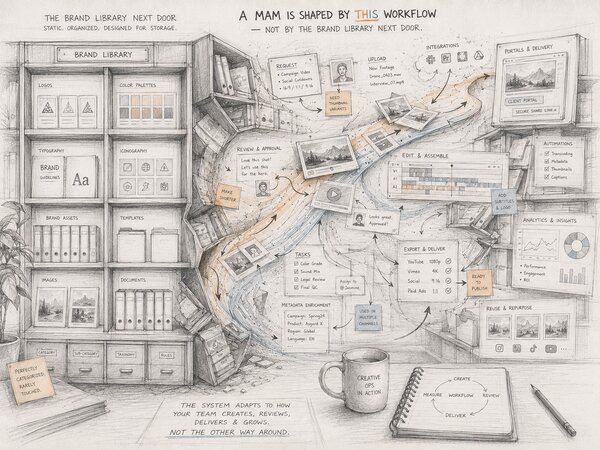
The DAM’s native strengths are the things a brand team needs every day: tag taxonomies that scale across asset types, version control on brand-approved files, expiry dates on stock-licensed images, branded portals that send finished work to clients, and access controls fine-grained enough that a freelancer sees only the assets for their campaign. The DAM treats every asset as one searchable unit — one row in a database, one filename, one set of metadata. That’s the right model when the file is a photo or a logo. It’s the wrong model when the file is a 90-minute master and the editor needs to find a 4-second clip inside it.
The foundational DAM piece goes deeper on what a DAM does at the feature level; here it’s enough to say a DAM is a marketing-team-shaped tool. Brand asset libraries are the canonical use case — brand teams were the first buyers and most modern DAMs are still optimised for them.
DAMs worth shortlisting
- Byndercustom pricing — broad integration ecosystem(opens in new tab) and one of the most-seen names in enterprise RFPs; per-seat pricing on request, SSO and SCIM typically gated to higher tiers
- Brandfoldercustom pricing — Smartsheet-owned since 2020, strong on brand-portal experience and external sharing; per-seat tiered plans with capability gates by plan
- Frontifycustom pricing — brand-guidelines and brand-portal focus, popular with marketing-led teams that lead with style guides; subscription pricing on request
MAM: For Video and Broadcast Teams#
A MAM is video-first. The MAM system was built for long-form footage management — television production, film post, news archives, sports broadcast. Where a DAM treats a 90-minute master as one asset, a MAM treats it as 90 minutes of indexable content. The native feature set reflects that: timecode-accurate metadata, frame-accurate review and comments, transcoding pipelines that produce proxy files for editorial, tape and file ingest workflows, broadcast distribution to playout systems. Most brand teams never touch any of this; most video studios cannot work without it.
The workflows that need this are the ones a DAM can’t fake. News archive ingest, where every clip carries a timecode-locked transcript before it’s searchable. Post-production rough-cut catalogues with thousands of hours indexed by shot type. Sports highlight pipelines that tag every goal in a season at the second it happens. None of those work as one-row-per-asset; the asset is a timeline, not a file.
Modern MAMs have added DAM-style features — tag taxonomies, brand governance, social-asset sharing — but the depth of timecode-based metadata is what justifies the category. DAM metadata is asset-level; MAM metadata is timecode-level. That dimension difference is the reason you can’t cleanly migrate a MAM workflow into a DAM.
MAMs worth shortlisting
- iconik(opens in new tab)free / paid from $9/user/mo — cloud-native MAM with growing footprint in broadcast and post-production; usage-based pricing model that scales with storage and seats
- Evolphin Zoom(opens in new tab)quote-only — enterprise broadcast MAM with deep on-prem and hybrid deployments; enterprise contracts via Evolphin sales
- Avid MediaCentral(opens in new tab)quote-only — long-standing film and TV infrastructure tied tightly to the Avid editing ecosystem; pricing through Avid sales, contract-based
PAM: For Product / Production Teams#
PAM is two unrelated categories with the same acronym. Figure out which one a vendor means before anything else.
Product Asset Management. Assets tied to e-commerce SKUs — product photos, hero shots, lifestyle images, 360° spins, swatch images, retailer-syndication packages. The Product PAM works as a partner to a PIM (Product Information Management) system that holds the SKU and copy data. Common configurations: Salsify(opens in new tab) or Akeneo(opens in new tab) as the PIM, with a DAM (or a Product PAM module bundled with the PIM) holding the imagery. Bynder, Brandfolder, and other brand-DAMs have added product-syndication features that cover the basic Product PAM use case for many e-commerce teams.
Production Asset Management. Workflow-heavy MAM-relatives for film, TV, and game studios. Tracks the asset through pipeline stages: shot status, scene approvals, version history per artist, creative-deliverable handoff. Well-known options include ftrack(opens in new tab) and ShotGrid (now Autodesk Flow Production Tracking)(opens in new tab). These tools are built for production environments where the asset isn’t just “a video” or “an image” — it’s a 3D model in iteration 47, with a render pending review, with three artists touching it across two locations. No DAM/MAM hybrid covers this depth of pipeline workflow.
Vendors will use “PAM” for both without distinguishing. Ask which problem they mean before the demo goes any further. If the team ships product images to retailer feeds, the answer is Product PAM (or PIM + DAM). If the team renders 3D scenes for a feature film, the answer is Production PAM (ftrack, ShotGrid, or similar).
PAM tools worth shortlisting
- ftrack Studio(opens in new tab)from $25/user/mo — Production PAM for film, TV, and games; tracks shots, versions, reviews, and approvals through the creative pipeline. Per-seat tiered plans published on the ftrack site
- ShotGrid(opens in new tab)from ~$30/user/mo — Production PAM, the legacy choice in feature animation and VFX; bundled into Autodesk’s media and entertainment licensing, pricing via Autodesk sales
- Salsify(opens in new tab)quote-only — Product PAM delivered as a module inside the Salsify PIM; per-seat enterprise contracts. Akeneo(opens in new tab) and inriver(opens in new tab) offer similar PIM-bundled Product PAM coverage
Where the Lines Blur#
The categories were defined when the boundaries were clean. They aren’t any more. Modern DAMs ingest video, generate timeline thumbnails, and support timecode comments. Modern MAMs added brand governance, taxonomy management, and social-asset sharing. PIM + DAM combos cover most Product PAM use cases without buying a dedicated PAM. The buyer’s mistake is reading vendor decks that pitch the breadth as parity.
The two overlaps that come up most often in evaluations:
- The video-capable DAM. A modern DAM ingests a 90-minute master, generates a thumbnail timeline, and lets reviewers leave timecode-anchored comments. That covers the marketing team’s video workflow — sharing finished spots, collecting agency feedback on cuts, archiving deliverables. It doesn’t cover the post-production studio’s workflow: no proxy generation, no timecode-locked transcripts, no broadcast distribution. Use a DAM for video if your videos are deliverables; use a MAM if your videos are working footage.
- The brand-aware MAM. Iconik and other cloud MAMs have added DAM-style brand governance — logo libraries, approved-asset libraries, tag taxonomies. This works for video studios that also produce marketing collateral and don’t want to buy two systems. The catch is that those brand features are shallower than what a marketing team would buy on its own. Fine if video is the main event; the wrong trade if marketing is.
The PIM+DAM-as-Product-PAM pattern is closely related but cleaner. Most e-commerce teams skip the dedicated Product PAM purchase entirely — the PIM (Salsify, Akeneo, inriver(opens in new tab)) holds the SKU data, the DAM holds the imagery, an integration links them. Standalone Product PAM only earns its budget line when retailer-syndication or feed-management needs outrun what that combination can do.
The real question isn’t “DAM or MAM?” It’s whether the depth of category-specific features is worth the breadth you lose. A marketing team picking a video-capable DAM keeps most of the brand workflow but only covers lightweight video needs. A video studio picking a brand-aware MAM gets the full video workflow but a thinner version of brand governance. Both are reasonable trades — which one is acceptable depends on which workflow the team runs at higher volume.

The Side-by-Side#
The table is the same shape as the engineering ticket from the opening — the row your team can’t live without is the one that determines the right column. ✓ Strong native fit. ~ Basic, often added recently. × Not the focus of the category.
| Capability | DAM | MAM | Product PAM | Production PAM |
|---|---|---|---|---|
| Ingest of multi-TB raw video | ~ | ✓ | × | ✓ |
| Timecode-accurate metadata | ~ | ✓ | × | ✓ |
| Transcoding / proxy pipeline | × | ✓ | × | ✓ |
| Frame-accurate review & comments | ~ | ✓ | × | ✓ |
| Asset-level brand governance | ✓ | ~ | ~ | × |
| External sharing (clients, agencies) | ✓ | ~ | ~ | ~ |
| SKU / PIM integration | ~ | × | ✓ | × |
| Pipeline-stage workflow (shot tracking) | × | ~ | × | ✓ |
| Royalty / rights tracking | ✓ | ~ | ~ | ~ |
| AI tagging across asset types | ✓ | ~ | ~ | × |
| Cost ballpark (entry-tier monthly) | $$ | $$$ | $$ | $$$ |
A DAM pushed into post-production transcoding is outside its category. A Production PAM used for brand-portal sharing is the same. The table shows where those lines are — use it to find the column where your non-negotiables are all ✓, not to find the tool that scores highest overall.
Picking the Primary System#
One tool wins; others integrate to it. The mistake teams make is buying a DAM and a MAM and expecting clean two-way sync — that was the three-quarters of engineering time in the opening ticket, and it’s why the integration is now an asset nobody owns. Pick the primary system based on the workflow your team runs every day. Treat the secondary as a satellite that exports finished assets to the primary, one direction only.
Marketing or brand-led team. DAM primary. If a video studio sub-team needs MAM features, run a MAM as a satellite that exports finished cuts to the DAM. The integration is one-way: master files live in the MAM, marketing-ready cuts land in the DAM with brand metadata. Don’t try to share metadata between them.
Video studio or broadcaster. MAM primary. If marketing teams downstream need brand-asset libraries, run a small DAM as a satellite for finished deliverables. The MAM owns the working footage; the DAM owns what ships to clients and channels.
E-commerce. PIM + DAM, no Product PAM. The PIM holds the SKU and copy, the DAM holds the imagery. The only reason to add a dedicated Product PAM is retailer-syndication or feed-management depth that the PIM+DAM combo can’t reach.
Film or game studio. Production PAM (ftrack, ShotGrid, or similar) primary. The pipeline workflow is the value; no DAM/MAM hybrid replicates it. A DAM handles finished deliverables — the version that ships to a streamer or a publisher — and nothing earlier in the pipeline.
Once the category and primary system are chosen, the buyer’s guide for picking a specific DAM covers the feature-by-feature evaluation. The same shape of decision applies to MAM and PAM evaluations: identify the non-negotiables, demo against a real asset at real volume, and don’t buy the breadth pitched in the sales deck.
Conclusion#
Go back to the integration ticket at the top of this piece. The fix wasn’t a better integration. It was naming one system as primary before the RFP went out: the brand team’s DAM as the destination, the video studio’s MAM exporting finished cuts on a clear schedule, no attempt to sync metadata both ways across systems that model assets differently. That shape of integration is cheaper to build, easier to maintain, and the failure mode is obvious instead of insidious when a vendor changes their schema.
One question before the vendor shortlist: which workflow does the team run every day? Get that answer first. The right category becomes obvious, the shortlist shortens to three or four tools, and the demo becomes a test against a real asset at real volume rather than a walk through a slide deck. Skip that question and you are back to the integration ticket two years from now.
Frequently Asked Questions #
Can a DAM replace a MAM?
Do I need a PAM if I already have a DAM?
What is the difference between Product PAM and Production PAM?
Can one system handle both DAM and MAM workflows?
How much does each category cost?
Which tools dominate each category?