Key Takeaways — brief reading, less than 30 seconds
- A DAM should know the people around the work: clients, reviewers, approvers, freelancers, and agency partners.
- A contacts layer is not a CRM. It tracks people, companies, labels, and timezones — the shape of who works on what — not pipeline or deal value.
- Start with a small contact record: display name, optional company, job title, multiple emails, labels, and timezone. Labels carry the workflow status (approver, NDA-signed, freelancer); skip dedicated fields for each.
- Portals, shares, comments, and audit logs scoped to contacts are easier to revoke, trace, and explain.
- Contacts are the base for projects, briefs, approval routing, and freelancer workflows.
Glossary7 terms
- Contact: A record of a person who touches creative work — client, reviewer, approver, freelancer, agency partner. The unit of identity that ties a human to the projects, portals, and shares they’re involved in.
- Contacts layer: A DAM subsystem dedicated to storing, grouping, and routing contacts. Distinct from a CRM in scope (working relationship, not the deal) and in ownership (creative ops, not revenue ops).
- CRM: Customer Relationship Management system. Tracks the deal — pipeline stage, lead source, close probability, owner. Sales-shaped lifecycle; revenue ops owns the data.
- Creative Operations (Creative Ops): The operational function around producing creative work — brief intake, approval routing, freelancer onboarding, client portals, billing handoffs. Sits between marketing strategy and individual creative execution.
- Creative Ops DAM: A DAM whose product surface extends beyond storage into the operational layer (briefs, approvals, contacts, portals, billing). Distinguishes from "asset vault" DAMs that stop at storage and sharing.
- Portal: A persistent, branded delivery surface scoped to an audience (a set of contacts). The audience is stable; the contents update. Opposite of share-by-link, where the link is the audience and the contents are stable.
- Label: A workflow tag on a contact — approver, NDA-signed, freelancer, billing, blocklist. The vocabulary is yours. Labels drive share filters, portal targeting, and routing in place of dedicated boolean fields for each concept.
Editor's note: YetOnePro ships a contacts layer scoped to creative workflow — reviewers, approvers, agency partners, the people who touch the work. This is not a CRM. The article explains why that distinction matters, and why we ended up building it on the way to a Creative Ops DAM rather than asking customers to bolt one on.
On May 16, 2026, a Palantir deployment strategist told Forbes that SaaS is dead(opens in new tab). The piece scoped what that meant: not that software-as-a-service evaporates, but that the template model the category was built on — off-the-shelf product, seat-based pricing, shared feature roadmaps — is losing its argument against AI-accelerated systems built around the customer’s real work.
For a DAM that means something specific. For teams doing multi-party review, storage plus sharing is no longer enough — the work also runs on brief intake, approval routing, freelancer onboarding, client portals, and billing handoffs. Every one of those operational layers has the same prerequisite: knowing the humans involved. The asset library is the easy half of creative ops; the names attached to every brief, approval, portal, share, and invoice are the half that’s usually missing.
The brief lists six approvers by first name. The share link goes to a Slack thread. The freelance retoucher gets a Google Drive folder with the wrong permissions and re-uploads the deliverables to a different folder than the one the project manager checks. Two weeks later somebody asks “who actually signed off on V3?” and the answer is in three different inboxes.
Many agency and studio teams we work with run on people the DAM doesn’t know about. The asset is in the library; the person who owns the next decision on it is not. A DAM that stores files but doesn’t model the humans around them is solving the easier half of creative ops.
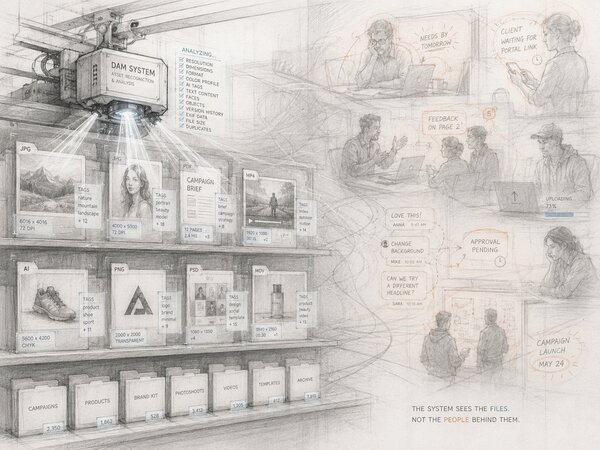
Why Contacts Belong in a DAM#
For most of the DAM category’s history, “the people” lived somewhere else. The asset library was for assets; clients were in a CRM; freelancers were in a spreadsheet or an accounts-payable system; reviewers were a habit (“always loop in Anna from legal”) more than a record. The split made sense when DAMs were brand-asset vaults and the work flowed in only one direction: marketing pulled an asset, used it, moved on.
That model breaks the moment the work flows in both directions. A creative team sending proofs to a client needs to know which version each approver saw, who’s already commented, who’s blocking the next round. A photo studio handing off a shoot needs to know which retoucher has which selects, on what watermark setting, by when. An agency running a campaign across three brands needs to know that the legal reviewer on Brand A is not the same legal reviewer on Brand B. None of that is asset metadata. All of it is contact metadata — and it lives wherever the team has improvised it.
The contact is the missing record. Once you have one, you can attach it to the things the team is already doing inside the DAM: a portal, a share link, a comment thread, a watermark. Without it, every one of those features falls back to anonymous tokens — which is what most legacy DAMs ship, and why most teams that use them end up tracking the same names in a spreadsheet anyway.
This is where our Creative Ops DAM direction starts. A vault for files is a commodity now. What we’ve been seeing across our own customers is that the value sits above the files: who’s reviewing what, who’s allowed to see which round, who opened which share, who’s overdue on a sign-off. Calling that “CRM” is misleading — it’s creative operations — but it has to start with a real record of the humans involved. Contacts is the starting point. The rest of the Creative Ops layer follows — and the order it ships in matters.
Worth being explicit: this isn’t a reaction to Forbes. Contacts shipped on May 17, 2026 — the day after the Palantir comment ran — off a roadmap we’d been building toward for months. What comes next is on a public roadmap below. Each piece plugs into the one before it; shipping them out of sequence would leave half the operational picture without a home.
Creative Ops Roadmap
Contacts
A people-aware record of every client, reviewer, approver, freelancer, and agency partner who touches the work. Powers portals, watermarks, share links, and approvals.
Intake Forms
Branded request intake — clients submit briefs through a workspace-scoped form that lands in a Requests inbox, ready to triage and auto-create the contact on approval.
Projects
A project is not a folder — it groups assets, briefs, contacts, approvals, and timelines under one identifier with its own lifecycle.
Approval Workflows
Routed sign-offs across stakeholders and rounds, with an audit trail that explains exactly who approved what, when, and on which version.
Custom Workflows
Build the operational flow your team actually uses — triggers, conditions, actions, and integrations spanning the rest of the Creative Ops layer.
The pieces target three businesses we hear from most: marketing agencies, photo studios, and travel operators. Their workflows differ in detail but share the same shape — heavy multi-party review, recurring client relationships, lots of freelancers in the loop. None of what’s shipping replaces what’s already working in those teams; the Creative Ops layer slots into your existing DAM and your existing tooling, so current operations keep running while the new pieces come online. The whole layer ships under our honest pricing — every feature available to every customer, no per-seat surcharges or upsell tiers.
Why a DAM Contacts Layer Is Not a CRM#
The natural objection: “you’re describing a CRM, just call it a CRM.” We don’t, and the difference is worth being precise about.
A CRM tracks the deal. Lead source, pipeline stage, deal size, close probability, last contacted, next action, owner. The lifecycle is sales-shaped: prospect → qualified → opportunity → closed-won/lost → renewed. The unit of work is the account; the unit of value is revenue. The contact record on a CRM exists mostly as the person attached to the account or opportunity.
A DAM contacts layer tracks the working relationship. Who the person is, what they do, which company they’re attached to, which emails reach them, and what labels mark their role on your work — approver, freelancer, NDA-signed, billing. Timezone for scheduling. The lifecycle is project-shaped — briefed → in review → approved → archived — and the same contact moves through that lifecycle on many projects in parallel without the record changing shape.
The two systems don’t conflict; they overlap on the email address and diverge on everything else. A CRM that tries to model “legal reviewer of round 2” ends up with a custom-field swamp and an unhappy sales team. A DAM that tries to model deal stage and pipeline probability ends up duplicating the system the revenue team already trusts. Neither side benefits from the merge.
The other reason to keep them separate is ownership. Revenue ops owns the CRM. Creative ops owns the contacts that touch the work. Those teams report up to different VPs, run on different cadences, and have different opinions about what “clean data” means. Forcing them into one shared record is how you get the worst of both governance models. Creative operations as a function already exists; giving it a system that fits its job, rather than a sales tool with the fields renamed, is overdue.
The integration story is the simple part. The CRM still holds the account. The DAM holds the people who touch the creative. When the two systems need to talk — usually around a new client onboarding — an email match or an explicit handoff covers it. For many teams, a manual onboarding handoff is enough.
The Contact Record (What to Track)#
The minimum viable contact for creative ops is short. The trap is over-modelling early: importing the CRM schema, asking for industry vertical and annual revenue and lead source, then watching nobody fill any of it in. Start with what the work actually needs. The full set we ship is below.
| Field | Why it’s here | Example |
|---|---|---|
| Display name | The identity shown across the UI. Required; can be a nickname or a full name. | Anna Schmidt |
| Company | Optional link to a Company record. Groups contacts for shares, portals, and audit; lets you target a whole client team in one move. | Brand X GmbH |
| Job title | Optional free-text — the CRM-style label for what they do. | Marketing Director |
| Emails (multiple) | A contact can carry several email addresses — work, personal, brand alias — and all of them resolve to the same record. | anna@brandx.com, a.s@gmail.com |
| Phones (multiple) | Several phone numbers per contact (mobile, office, WhatsApp), each with its own type. | +49 30 1234 5678 |
| Social links (multiple) | Free-form platform + handle. LinkedIn, Slack, Discord, whatever your team uses — we don’t prescribe the platform list. | LinkedIn: /in/aschmidt |
| Labels | Carries workflow status. Tag contacts with whatever your team needs to filter on: approver, NDA-signed, freelancer, billing-contact. | approver, NDA-signed |
| Timezone | For review-meeting scheduling and portal context. | Europe/Berlin |
| Memo | Free-text notes — “prefers PDF over Figma,” “OOO every Thursday,” whatever the team needs to remember. | (free text) |
| Active / Inactive | Operational status. Flip to Inactive when someone leaves their company; the contact stays for audit history. | Active |
Three of these earn a second look, because they’re the ones generic contact systems tend to get wrong.
Labels carry workflow status. We deliberately don’t ship a dedicated field for “NDA signed” or “approver” or “freelancer.” Labels do all of it. Every team’s vocabulary is different enough that a field-per-concept model creates more friction than it solves — NDA flag, role tag, billing tag, blocklist, all the same mechanism in your own wording. Share filters, portal targeting, and audit reports run on labels.
Multiple emails on one contact. A working professional often has a corporate address, a secondary or legacy vendor address, and sometimes a forwarding alias for a brand account. All of them resolve to the same contact. When any of those addresses opens a share, the analytics, the audit log, and the share-revocation tooling roll up against one human, not three.
Company as the group key. Sharing to a Company auto-includes every contact attached to it; you don’t maintain a per-share recipient list. When the client’s marketing team rotates a person in or out, you update the contact’s Company link once and every Company-scoped share, portal, and rule picks up the change.
Contacts and the Portal They See#
The payoff of the contact layer is everywhere the DAM already talks to the outside world: portals, share links, comment threads, watermarks. With contacts, each of these features attaches to a person; without, each one falls back to an anonymous link with weak attribution.
Portals. A portal isn’t really a folder — it’s an audience. The audience is a set of contacts (sometimes a company, sometimes a label, sometimes a one-off person). When you add a contact, they get access; when you remove a contact, they lose it. The portal’s contents update; the audience is stable. This is the opposite of how share-by-link works in most legacy DAMs, where the link is the audience and the contents are stable, and revocation requires rotating the link and notifying every recipient out of band.
Share links. A share link signed to a contact records who opened what and when. Even when the link is technically public (because the client’s legal team requested no login), tying it back to a contact at issuance time means the analytics and the audit log resolve to a human name rather than a recycled token. Sharing files with clients stops being “send a link, hope nothing leaks” and starts being something the system can audit, report on, and revoke.
Watermarked share + named recipient. Watermarks are workspace-configured — template, opacity, position — not personalised per recipient. The contact layer carries the other half: when the watermarked asset surfaces somewhere it shouldn’t, the audit log resolves “who opened this share” to a named human rather than a recycled email address. Deterrent at the workspace level, attribution at the contact level.
Comment threads. A comment from a contact is more useful than a comment from guest@anonymous. Threading by contact means the next round’s reviewer can read what the legal reviewer wrote on the previous round without playing detective in a Slack archive.
Activity log. The audit trail of who saw what, who commented, who downloaded, who shared further — all of it is more legible when the actor is a named contact rather than an email address that may or may not be the same person from one share to the next.
None of these are new features. They’re features that already exist in most DAMs. The contact layer just attaches a named person to each of them.
Working with Contacts: Three Real Patterns#
The contact layer looks slightly different depending on which kind of creative team is using it. Three patterns cover most of what we’ve seen.
1. Agency client work. Contacts are the client side: the brief owner, the marketing lead, the legal reviewer, the brand guardian, the executive sign-off, plus their agency-side counterparts. Companies group them; labels mark roles (“approver,” “courtesy CC,” “billing”) and gates (“NDA-signed” for the pre-launch portals). The portal is the deliverables hub for each project — contacts come and go as approvers rotate. A branded client portal with a contact-driven audience is usually the baseline expectation here.
2. In-house creative team. Contacts are stakeholders across the company — marketing, product, sales enablement, legal, the executive office. The lifecycle is rolling rather than per-project; the same people show up on twenty briefs a year. Labels distinguish “reviewer” from “recipient” from “observer.” The portal is usually scoped to a campaign or a launch, not a client; companies are irrelevant (everyone’s in the same company). The value of the contact layer here is mostly routing — making sure the right approvers see the right round at the right time.
3. Freelance / contractor flow. Contacts are the people you hire — retouchers, motion designers, copywriters, photographers. Labels carry the workflow status: NDA-signed, freelancer, billing-contact, whatever the team needs to filter on. The Active/Inactive flag retires people between bookings without losing the record. The pattern here is short, intense, high-turnover — and the contact record is what stops the team from re-onboarding the same freelancer from scratch every time they’re booked again.
Most teams run two or three of these patterns concurrently. The contact layer doesn’t have to choose between them — labels and companies let the same record serve all three. It shouldn’t try to replace the CRM unless you’re deliberately rebuilding that process. The lifecycle, the fields, and the team that owns the data are different enough that mashing them together is the kind of feature decision a DAM regrets later. We made the call to keep them separate.
Wiring This Into Your Library#
Two concrete next actions if you’re running creative ops on a DAM that doesn’t have a contact layer today.
First, list the people who’ve touched your work in the last quarter. Clients, reviewers, freelancers, agency partners. The list is almost always longer than the team expects — in our experience, the people who’ve touched a creative team’s work in a single quarter usually outnumber the team itself by several times over. That’s the population your DAM should know about. Every name on the list that lives only in a Slack DM or an inbox is a future “who actually signed off on V3?” question.
Second, decide which features in your current DAM should be contact-bound and which should stay link-based. Portals, contact-targeted shares, and review threads are the obvious wins. One-off public-link shares (a press kit, a public download) are fine as anonymous links. Drawing the line clearly is more useful than trying to convert every share to a tracked one.
The contact layer doesn’t replace a CRM, doesn’t replace project management, and doesn’t replace the freelancer Airtable. It replaces the spreadsheet of names that every team has and nobody admits to. Once the names live in the same system as the work, the work gets visibly easier — and the rest of the Creative Ops DAM story starts to make sense.
Frequently Asked Questions #
Why not just use our CRM for this?
Isn’t this just a contacts page like the one Dropbox or Google Drive shows?
What if a person is in two companies — agency and client side?
How does this relate to projects, briefs, and approval routing?
Do you sync contacts back to the CRM?
What about GDPR — these are real people’s personal data?