Key Takeaways — brief reading, less than 30 seconds
- Creative asset management is not a storage layer — it is the workflow that moves a request from brief to delivered asset: intake → routing → production → review/approval → delivery.
- CAM-vs-DAM is a false choice. A creative asset is in motion until approved, then a governed library asset — the same file, a different state. One system handles both.
- Intake forms and routing rules are the first-class spine of the workflow. A structured brief becomes auto-assigned, SLA-tracked work; most tools treat routing as a footnote, a request form with no logic behind it.
- Ungoverned review is costly: Ziflow's 2023 report found 57% of creatives see 3–5 versions per project, and 43% say feedback on an outdated version is an occasional-or-regular headache. Version every round and name the approvers.
- The stitched-tool tax (a DAM + a PM tool + a proofing tool + an analytics dashboard) creates four logins, four permission sets, and a seam where the wrong version ships. One system erases the seams.
- You may not need this category at all. If nothing happens to an asset between made and filed, buy storage. The tell that you have crossed over is somebody keeping a side spreadsheet of what is with whom — that is a workflow system being run by hand.
- AI is great at visual tagging and blind to anything it was not told — it cannot infer campaign, channel, or usage rights from pixels. Automate tagging, govern the taxonomy, and automate the workflow (routing, SLA escalation, auto-versioning, promotion to canonical).
Glossary7 terms
- Creative asset management (CAM): The system and workflow for handling creative assets across their whole life — intake, routing, production, review, approval, and delivery — not just where the finished files are stored.
- DAM: Digital asset management — software for storing, organizing, governing, and distributing finished digital assets such as images, video, and brand files.
- Intake form: A structured request form that captures the fields a maker needs (type, dimensions, channel, deadline, brand) as data, turning a vague request into routable, trackable work.
- Routing rule: Logic that auto-assigns an incoming request to the right person or queue based on type, brand, workload, or deadline — and can escalate when an SLA is at risk.
- Approval chain: An ordered sequence of required sign-offs (for example designer → brand lead → legal), where a rejection loops the asset back to the maker rather than stalling it.
- Single source of truth: The one canonical, approved, rights-cleared version of an asset that everyone references — the state a file enters the moment it is approved.
- Creative ops DAM: A DAM whose primary object is the workflow rather than the file: one system that spans intake to delivery, so the approved asset and the library asset are the same record.
Editor's note: This is a working guide, not a vendor brochure. The numbers here are third-party industry figures where cited, and operator estimates elsewhere (typical as of early 2026; your actuals vary). We build a DAM, so we have a view — we’ll tell you where it is.
A hero banner for a spring campaign lands as a Slack message. Whoever is free picks it up. It runs four review rounds, because legal joins late and catches a claim in the headline. It ships, more or less on time, and everyone moves on.
Six weeks later somebody needs it resized for a partner placement. The file is right there in the library, tagged and approved, exactly where it should be. What the library cannot tell them is that the approved version is round four rather than the round three sitting next to it, that legal cleared the photography for EMEA only, and that the agency sent a corrected logo lockup two days after sign-off which nobody folded back in. Those three facts did exist. They were in a Slack thread, a comment, and somebody’s memory. They were not in the file.
The library did its job there. It stored the file, kept it findable, and recorded that somebody had approved it. What it could not say was which approval, on which round, cleared for what. That kind of fact comes from upstream, from the work that made the file, and it is the part teams tend to skip past when they go shopping for software.
Which is why the term creative asset management misleads. The words that draw the eye are creative and asset, and both get read as storage: a tidier shelf, better tags, faster search. The word doing the work is management. Not where the file rests, but the intake, the routing, the review rounds, the approval, and the handoff that put it there.

What Creative Asset Management Really Covers#
Strip away the marketing and creative asset management is a system for handling creative assets across their entire life, not just where they sit but how they come into being and how they leave. A creative asset is any file a creative team produces or depends on: a logo, a layout, a 30-second cut, a set of social tiles, the brand fonts, the audio files behind a podcast.
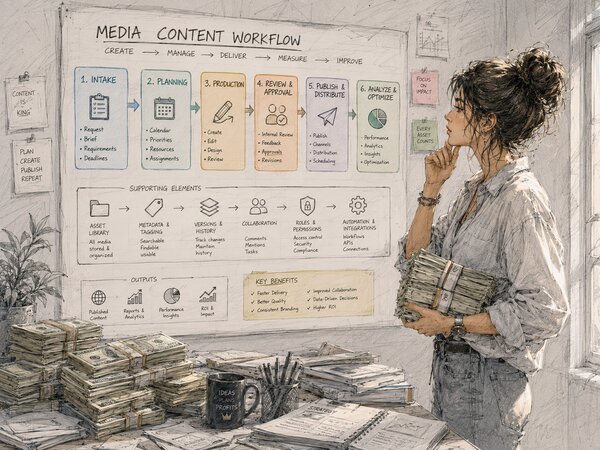
The lifecycle breaks cleanly into five stages, and they map almost exactly to a creative ops manager’s actual job: intake → routing → production → review and approval → delivery. A request comes in. It gets assigned to the right person. Someone makes the thing. Stakeholders review it and sign off. The approved asset ships and becomes the single source of truth. A good creative asset management system holds all five stages in one place; most tools hold one or two and leave you to bolt on the rest.
A pile of digital assets with good metadata answers one question well: does this exist, and is it approved? Teams tend to be asking something harder by the time they go looking for software, which is where a given request has got to, who is holding it, and what it is waiting on. A catalog does not answer that, and no amount of tagging makes it. If your team keeps asking the second sort of question and the tool only handles the first, a longer feature list will not rescue it. You bought the wrong kind of thing.
Creative Asset Management vs DAM: The False Choice#
Search for “creative asset management vs DAM” and you’ll get the same two-column table everywhere: creative asset management is the active, in-progress work; digital asset management is the finished, governed library. The framing isn’t wrong, exactly. It’s just incomplete, because it presents a choice that doesn’t need to exist.
Here is the standard split, plus a third column for the approach we think resolves it, a DAM whose primary object is the workflow rather than the file:
| Dimension | Pure CAM tool | Legacy DAM | Creative ops DAM |
|---|---|---|---|
| Primary object | The in-progress project | The finished file | The workflow (file is the output) |
| Intake | Request form, often basic | Rarely handled | Structured forms + routing rules |
| Review & approval | Strong (proofing core) | Usually absent | Governed: versioned rounds, audit trail |
| Governed library | Weak — punts to a DAM | Strong (the point of it) | Strong — same system, post-approval state |
| Permissions | Project-scoped | Library-scoped | Role-based across the whole chain |
| The handoff | Manual export to a DAM | Manual import from a tool | A state change, not an export |
| Lifecycle covered | Production half | Storage half | Intake → delivery, end to end |
The reason the two-camp split persists is that the market is genuinely split. On one side sit the legacy DAM platforms (Bynder, Brandfolder, Canto), built to store, govern, and distribute approved creative assets. Several of them bolt a workflow module onto that core. Bynder’s Asset Workflow does briefing, annotation, version control, and approval routing. But the library stays the primary object, and the workflow feeds the shelf rather than the other way round. On the other side sit the production and creative-automation tools, Air and the proofing-first crowd, built to make and review work quickly and thinner on the governed library that has to come after. (Aprimo sits in neither camp: it’s an enterprise governance and rights platform, which is a third answer to the same problem and a considerably heavier one.) Each camp owns part of the lifecycle and sells you the part it owns.
The honest answer is that it was never CAM or DAM. The fight is an artifact of how the tools were built, not how the work is done. A creative asset is in motion right up until it is approved, and then it is a governed library asset. Same file, different state. If one system handles both states, the “versus” disappears. We wrote a fuller primer on what digital asset management is if you want the foundation; the point here is that the modern version of it doesn’t stop at the library door.
Where It Starts: Intake and Routing#
What follows is the short version of the operating layer, because we make the full operational case for running it end to end in intake to delivery. Read that one for the argument; read this section for what the stages are.
Intake is where the workflow either earns its keep or quietly fails, and a real intake form is not paperwork. It forces the requester to supply the fields the maker needs (deliverable type, dimensions, channel, deadline, brand, reference links), captures them as structured data rather than prose so the system can act on them, and timestamps the start, which is the only honest place a deadline clock can begin. (Anyone who has estimated a creative project timeline knows the clock starts at the brief, not at “designer opens the file.”) Routing then decides where that request goes, by type or brand or workload or deadline urgency, escalating when an SLA is about to slip. A good creative brief template is the front half of this; intake is where it becomes a system input, and routing is the layer most tools leave as a form with no logic behind it.

Review, Approval, and the Handoff That Closes the Loop#
Review is usually described as “pin a comment, leave an annotation.” Comments matter, but they’re the easy half. The governed half is the part that goes wrong: which round are we on, who still needs to sign off, and did the last reviewer comment on the current version or an outdated one. Ziflow is a proofing vendor, so read this with that in mind, but it ran a 2023 State of Creative Workflow survey(opens in new tab) with the AMA and found that 57% of creatives see three to five versions of a project before it’s called done, and 43% say feedback landing on an outdated version is an occasional-or-regular headache in their process. (Ziflow doesn’t publish the sample size outside the gated report.) Our read of that second number: if nearly half a profession routinely hits stale-version feedback, the review stage is generating rework, not only delay.
A governed review stage versions every round, names the required approvers in order, and keeps an audit trail of who said yes and when. That is the substance of our design approval process guide. Two things follow that matter for the category question. The first is that “approved” becomes a state the system records rather than a word someone said in a meeting. The second is that the asset changes state at that instant: it stops being in-progress creative and becomes the canonical, rights-cleared deliverable, with usage rights settled at the same gate rather than chased afterwards (the subject of our image rights management guide). In one system that transition is just a state change. Across two it is a manual export, which is one more place the wrong file can get picked up.
One System or Four: The Category Decision#
The setup we see most often, and this is our observation rather than a surveyed number, is four products doing one job: a DAM for storage, a project tool for the work, a proofing tool for review, a dashboard for performance. Four logins, four permission models, and a seam at every join. I call it the stitched-tool tax. I cannot put a figure on it, because nobody has published one I trust, and I would rather say that than invent a percentage.
What matters for choosing a category is narrower than the cost. Running one system or four is a category decision rather than a feature comparison, and the usual comparison table never gets near it, because it lines up capabilities within a category instead of asking which category you need. One permission model that follows the asset across the whole chain is what makes client and partner file access a first-class case rather than an afterthought. Our own position is the plain one: we’re not selling a library plus a separate workflow product.
When You Don’t Need Creative Asset Management#
Plenty of teams are sold this category before they need it, so here is the honest disqualifier. If nothing happens to your assets between “made” and “filed”, meaning no review rounds, no approvals, no external partner, then you do not have a workflow problem. You have a storage problem, and you should buy storage. A plain DAM with disciplined metadata will serve a stock library, a photo archive, or a brand-asset shelf better than any workflow layer, because the workflow layer will sit there costing money and asking to be configured.
Two more cases where a plain DAM wins. When the requester and the maker are the same person, routing has nobody to route to. And when volume is genuinely low, a handful of requests a month with everyone within earshot, the coordination overhead of a structured intake exceeds what it saves; a shared folder and a conversation are faster. Buying ahead of that point is usually how software ends up unused.
The crossover has a reliable tell, and it is not volume. It is the moment somebody starts keeping a side spreadsheet: a tab tracking what is with whom, which round it is on, what is still waiting on legal. That spreadsheet is a workflow system being run manually. Once the tracking lives outside the tool that holds the files, the tool has stopped covering the job, and better tagging will not bring it back inside.
AI, Metadata, and Where Automation Earns Its Place#
No 2026 guide to creative asset management can skip AI, so let me be specific about where it earns its place and where it’s decoration. The genuinely useful application is the boring one: tagging. AI image tagging can auto-tag thousands of creative assets on upload, generating searchable keywords without a human typing them, which is the difference between a library you can search and a folder tree you have to remember. We tested this hard in our piece on AI image tagging, and the honest finding is that it’s excellent at visual description and blind to anything it wasn’t told. It will tag “person, laptop, office.” It cannot infer “Q4 campaign, approved for EMEA, do not use after December”, because that lives in your system rather than in the pixels.
That gap is why metadata and taxonomy still matter, and why I get nervous when a vendor implies AI makes them optional. A controlled vocabulary keeps your tags consistent so search actually works; AI fills the vocabulary faster than a human can. The two are partners rather than substitutes, and the structure we lay out in the DAM metadata taxonomy guide is what gives AI-generated tags somewhere coherent to land. Automate the tagging by all means, but keep the vocabulary under human control.
The other place automation belongs is the workflow itself, which loops back to where we started. The unglamorous automation lives here: routing rules, SLA escalation, auto-versioning each review round, and promoting an approved asset into the canonical library. None of it is flashy, and all of it removes the manual handoffs where time leaks out of a creative project. Performance analytics close the loop, telling you which approved asset drove the result, but that data is only trustworthy if the workflow that produced the asset was governed in the first place.
Which is the unglamorous limit on all of it. However good the model, a stitched-tool stack still cannot tell you which file actually shipped, and no analytics layer can reconstruct that after the fact.
So when someone asks me what creative asset management is, I do not start with storage. I start with the request, because the file is what comes out the other end. What is worth paying for is the workflow that gets a brief all the way to a finished file. Signed off by the people who had to sign it off, rights settled at the time rather than chased later, and nobody guessing six weeks on about which version was the real one. The library part tends to follow from that. It rarely works the other way round, which is the mistake this category keeps selling.
Frequently Asked Questions #
What is creative asset management in plain terms?
What is the difference between creative asset management and DAM?
Why are intake forms and routing rules such a big deal?
Do I really need a single system, or can I stitch tools together?
Where does AI actually help with creative asset management?
How does review and approval go wrong, and how do you fix it?