Key Takeaways — brief reading, less than 30 seconds
- Before comparing tools, make one decision: name the single workflow stage that leaks the most time. Buy the system that owns that stage end to end.
- Three categories get called "creative ops tools" but do different jobs: project management (the schedule), DAM (the asset library), and proofing (the approval record).
- The fragmented default — buy a PM tool, a DAM, and email approvals separately — carries an integration tax: manual handoffs, version chaos, missing audit trails, adoption decay.
- Match the bottleneck to the category. Lost requests = intake. Stalled work = routing/PM. Spiraling revisions = proofing. Lost assets = DAM and AI tagging.
- AI earns its keep only when tied to a stage: auto-route at intake, auto-version on review, auto-tag on delivery. Standalone "AI" is marketing.
- Month one is migration, then one workflow end to end, then expansion. The buyer who anchors on one system is measuring wins by week seven; the three-tool buyer is still wiring integrations.
Glossary8 terms
- Creative operations: The discipline of running creative work as a repeatable process — intake, routing, review and approval, delivery — instead of a series of ad-hoc one-offs.
- Creative Ops DAM: A digital asset management system built around the creative workflow, so intake, routing, review, and delivery live in one place rather than across three separate tools.
- Intake: The front door of the workflow: how a creative request enters the system, ideally through one structured form with a brief attached rather than scattered email and Slack messages.
- Bottleneck: The single stage of a workflow that leaks the most time. The first purchase decision is naming it, then buying the system that owns that stage end to end.
- Fragmented-stack tax: Our shorthand for the hidden cost of running separate PM, DAM, and proofing tools: manual handoffs, version chaos, missing audit trails, and adoption decay across multiple logins.
- Audit trail: A durable record of who approved what and when. When approvals live in email there is no clean trail, which becomes a compliance problem months later.
- Project management (PM): Software that tracks tasks, deadlines, and capacity. Strong on the schedule, weak on storing assets, version history, and approval records.
- Digital asset management (DAM): Software for storing, tagging, and finding finished files. The library and source of truth for approved assets — strongest on delivery and reuse.
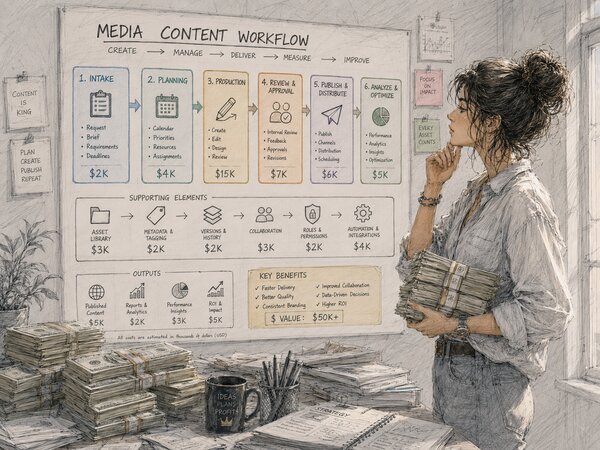
Editor's note: This is a buyer’s guide written from the operator’s side of the desk, not the vendor’s. We make a Creative Ops DAM, so we have a horse in this race — but the framework below works regardless of whose logo ends up on the invoice. Vendor prices are as published in mid-2026; the dollar figures in the second illustration are made up for shape, not quotes.
Almost every guide to creative operations software starts at the wrong end: ten tools, a feature matrix, a verdict — and no answer to the question that actually decides the purchase, which is which of three product categories do you need at all? Skip that question and the budget still gets spent. It buys a project management tool, a separate DAM, and a proofing app: all approved, all onboarded, none of them talking to each other. The chaos doesn’t move; it just gets a subscription.
So this piece flips the order. First the diagnosis — name the single stage of the workflow that is actually broken. Then the category that owns that stage from end to end, and only after that, the shortlist. Get the order right and the shortlist almost writes itself.
What “Creative Operations Software” Actually Means#
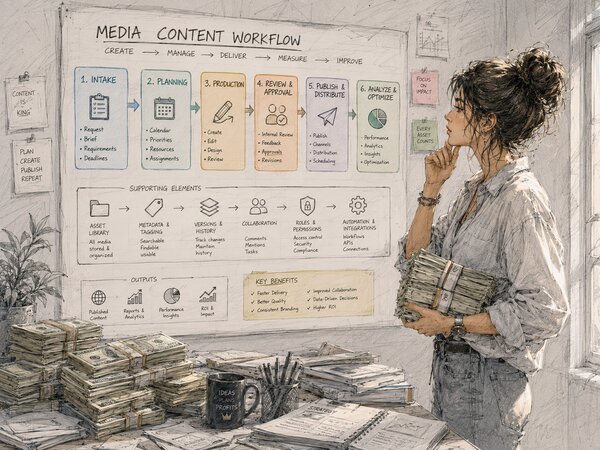
Creative operations is the discipline of running creative work like a repeatable production line instead of a series of heroic one-offs. The loop is always the same: a request comes in (intake), it gets routed to the right person (routing), the work is made and reviewed (review and approval), and the finished file is delivered and stored where the next campaign can find it (delivery). Adobe’s creative-ops guide walks the same ground(opens in new tab) — centralize request management, put a traffic manager on routing, let creatives “create, deliver, and measure their work in one place” — and the creative operations manager is the person who owns that whole loop — the human standing between a vague Slack message and a finished asset on the brand site.
So “creative operations software” should mean a system that runs that loop. In practice the phrase gets pinned on three very different kinds of product, and conflating them is where first-time buyers lose the plot. A tool that schedules tasks is not the same as a tool that stores and finds files, which is not the same as a tool that records who approved what. Each is real and useful. None of them is the whole loop on its own.
The Three Categories You’re Probably Confusing#
Three categories get mixed together under that label. Here is what each one is genuinely good at, and where it quietly falls short when you ask it to carry the whole workflow.
- Project management (PM). Tools like Asana(opens in new tab), Monday.com(opens in new tab), and Trello(opens in new tab). Brilliant at tasks, deadlines, and who-does-what. They make a creative team’s schedule visible. What they don’t do well: store the finished files, keep version history straight, or tell you who signed off on which version of the file. A PM tool tracks the work, not the asset.
- Digital asset management (DAM). The library. A DAM stores every approved file, tags it so it’s findable, and stops the brand from drifting into a dozen logo variants. What a plain DAM doesn’t do: route an incoming brief or run a structured review round. It’s the destination, not the conveyor belt.
- Proofing and review. Tools built around annotating a file and collecting sign-off — Frame.io, which grew up around video review, and Ziflow(opens in new tab), which came from print and static proofing. Both handle the other kind of file now. They turn the approval process into something you can actually track. What they don’t do: own intake, manage the schedule, or be the long-term home for the asset once it ships.
Notice the pattern. Each category owns one or two stages of the loop and leans on the others for the rest. The default move — buy one of each and wire them together — is exactly the trap. If you want the difference between a DAM and the media- and production-management cousins it gets confused with, we pulled that apart in DAM vs MAM vs PAM.
The Decision That Comes First: Find Your Worst Bottleneck#
The first decision is not “which tool,” and it’s not even “which category.” It’s which stage of your workflow leaks the most time. Everything else follows from that answer, including which of the three categories you shortlist at all. Work from a feature checklist instead and you’ll end up with three half-used products and the same bottleneck.
Run this self-diagnostic before you open a single pricing page. Walk the loop and ask where the pain actually lives:
- Where do requests get lost? If briefs arrive by email, Slack, and hallway, and half of them never make it onto anyone’s list, your bottleneck is intake. A structured intake process — one front door with a real creative brief template attached, so every request names its deliverable up front — is your first buy.
- Where does work sit waiting? If briefs land but stall because nobody decided who picks them up, your bottleneck is routing and capacity. That’s PM territory.
- Where do revisions spiral? If files bounce through six rounds of “final_v4_REALLY-final” and nobody can say which version got signed off, your bottleneck is review and approval. You need proofing with a real audit trail.
- Where do finished assets go to die? If approved work is impossible to find three months later, gets re-created from scratch, or drifts from your brand guidelines, your bottleneck is delivery and reuse. That’s a DAM problem, and AI tagging makes it tractable at scale — more on that below.
Usually one stage is clearly worse than the rest. That stage is your anchor. Sometimes two fail together and the coupling is the point — briefs go missing and approvals stall, because the same missing front door that loses requests also means nobody knows who the approver is. When that happens, treat the earlier stage as the anchor; fixing intake often takes the pressure off review without you buying anything for review. What doesn’t work is treating all four as equally urgent and buying a tool for each, which is how you spend the whole budget and fix nothing.
The Fragmented-Stack Tax Nobody Prices In#
The honest case for stitching point tools together is that each one is best-in-class at its job. The dishonest part is the bill nobody itemizes: the integration tax. Plenty of creative and marketing teams end up with this tech stack by accretion — a PM tool from one budget cycle, shared drives standing in for a DAM, approvals still in email — and the seams between them leak time every single day.
Here is what the fragmented default actually costs, beyond the line-item subscriptions:
- Manual handoffs. Someone exports the approved file from the proofing tool, renames it, uploads it to the DAM, and pastes the link back into the PM task. Every handoff is a queue, and every queue is wait time. Multiply by every asset, every week.
- Version chaos. The PM tool has a link to v2, the DAM has v3, and the proofing tool approved v4. With no single source of truth, the wrong file ships sooner or later. We get deep on this in version control for designers.
- The compliance gap. When approval lives in email, there’s no clean record of who signed off on what. Six months later legal asks “who approved this claim?” and the answer is a buried thread nobody can find. Treating approvals as a compliance record, not a nice-to-have, is the single most underrated reason to consolidate.
- Adoption decay. Three logins, three notification styles, three places to check. The team quietly routes around the tools that add friction, and the tooling budget becomes shelfware.
Vendors who sell unified systems make this exact argument(opens in new tab), and they’re not wrong to — the fragmentation pain is real. The catch is that “buy everything from us” isn’t a diagnosis either. The integration tax is the reason to anchor on one system that owns your worst stage; it’s not a reason to buy the biggest suite on day one.
Matching the Category to the Bottleneck#
Put the diagnostic and the categories side by side. This table is the whole decision in one view: find your worst symptom in the left column, and the system you should anchor on is across the row. Two rows name a fourth option, the Creative Ops DAM — that is the category that spans the loop rather than owning one stage of it, and it is the one we build, so weigh it accordingly.
| Your worst symptom | Broken stage | Anchor category | What it owns |
|---|---|---|---|
| Requests arrive everywhere, half get lost | Intake | Intake / Creative Ops DAM | One front door, structured brief, auto-routing |
| Briefs land but stall with no owner | Routing | Project management | Tasks, deadlines, capacity, who-does-what |
| Revisions spiral, no clear sign-off | Review & approval | Proofing / review | Annotation, version rounds, audit trail |
| Approved assets impossible to find or off-brand | Delivery & reuse | Digital asset management | Searchable library, AI tagging, brand control |
| All four leak and the seams cost you daily | The whole loop | Creative Ops DAM | Intake to delivery in one system |
One nuance worth saying out loud: a DAM built around the workflow — a Creative Ops DAM — is not the same animal as a plain asset library. It handles intake, routing, review, and delivery in one place, which is what closes the integration gaps above. If your worst bottleneck is delivery and reuse and you’re tired of the seams, that’s the category that earns the first purchase.
And the cases where it isn’t — we build one of these, so it’s worth being specific about when not to buy it. If your only real problem is scheduling capacity across a large creative team, a PM tool is the better anchor and a workflow DAM is expensive overlap. If your output is almost entirely video and your pain is review rounds, a specialist proofing tool will feel sharper than anything general-purpose. If your library is small enough that everyone genuinely knows where things are, you don’t have a delivery bottleneck yet and buying for one is buying early. And if the actual failure is that nobody has agreed who approves what, no system fixes that; a tool will just record the confusion faster.
Signs You’re Buying the Wrong Category#
The clearest way to get the first purchase right is to know what getting it wrong looks like. A few anti-patterns worth naming:
- Buying a PM tool when your real problem is asset reuse. The team can see every task and still re-creates last quarter’s hero creative asset because nobody can find it. A prettier task board doesn’t fix a missing library.
- Buying a DAM when nothing ever gets approved on time. A perfect library full of files stuck in review round five is a tidy bottleneck, not a solved one. Centralizing the storage doesn’t unstick the approval queue.
- Buying the all-in-one suite to avoid deciding. The biggest platform looks safe because it does everything. But if you can’t name the stage you’re fixing, you’ll under-configure the suite and use a fraction of it. Breadth is not a substitute for a diagnosis.
- Buying for the 300-person org you might become. Scalability matters, but enterprise-grade complexity has to be configured by someone, and on a small creative team that someone is usually the person who least has the time. Buy for the team you are, with room to grow.
Where AI and Automation Actually Earn Their Keep#
Every vendor now sprinkles “AI” across the page, and most of it is hand-waving. The useful test is whether the AI attaches to a specific stage of your workflow rather than floating above it as a feature. Tie the automation to the loop and it earns its keep:
- Auto-route at intake. A smart intake form can read a request and route it to the right queue or owner without a human triaging the inbox. That’s automation removing wait time at the front door.
- Auto-version on review. When a new file lands, the system creates the next version automatically and keeps the comment thread attached, so the proofing round and the version history stay in sync. No manual rename, no lost annotations.
- Auto-tag on delivery. This is where AI pays off hardest. A DAM that runs computer vision and language models over every upload makes the library findable without a human typing keywords into a metadata field — the difference between a searchable archive and a folder graveyard. We tested how well this actually works across six industries in our AI image tagging deep-dive, and tied it to controlled vocabulary in the metadata taxonomy guide.
Notice that none of these are “AI” as a standalone selling point. Each one shaves time off a named stage — intake, review, or delivery. When you evaluate a tool, ask the vendor which stage their AI touches and what it removes. If they can’t name the stage, treat the AI as marketing. If they can — “it tags every upload, so the library stays searchable without anyone typing metadata” — that’s a productivity claim you can test against your own back catalogue during the trial, and a stage you can keep optimizing once you have a baseline.
What Month One Actually Looks Like#
The part that decides whether the purchase works is the first 90 days. Here is the honest version, and the week numbers below are our rough shape for it rather than a measured schedule — assuming you made the anchoring decision above.
Weeks one to two: migration and the switching cost. This is where the real bill arrives. Moving off Google Drive, Trello, and email approvals means re-homing files, rebuilding the folder logic into a tag taxonomy, and re-creating in-flight projects. You lose the muscle memory of the old shortcuts and the team grumbles. Budget for it honestly — we wrote the field guide in moving from Google Drive to a DAM. The migration is a one-time tax; the fragmented stack is a recurring one.
Weeks three to six: one workflow, end to end. Resist the urge to migrate everything. Pick the single workflow tied to your bottleneck — say, social campaign intake to delivery — and run it entirely inside the new system. One real loop working beats ten half-configured ones. This is also where adoption is won or lost: if the team sees one workflow get genuinely faster, they pull the rest in themselves.
Weeks seven to twelve: expand and measure. Now widen to the adjacent stages. Add the next workflow. Turn on the AI tagging and let the back catalog become searchable. Pull approvals out of email so the audit trail starts accumulating from day one. By the end of the quarter you should be able to answer the question that started this whole project — “where does work get stuck?” — with a number, not a shrug.
The buyer who skips the diagnosis and buys three tools rarely reaches week seven on schedule. They’re still wiring integrations and chasing adoption across three logins. The buyer who anchored on one system that owns the worst stage is already measuring the win. Same budget, completely different quarter.
So before you compare anything: walk your loop, name the stage that leaks the most time, and buy the system that owns it. That one decision — made first — is worth more than any feature comparison you’ll do afterward.
Frequently Asked Questions #
What is creative operations software?
What do first-time creative ops buyers most often get wrong?
Is buying three separate tools cheaper than one unified system?
How do I know which workflow stage is my real bottleneck?
What does the first 90 days with a new creative ops tool look like?
How much should a first creative ops purchase cost?
Where does AI actually help in creative operations?