Key Takeaways — brief reading, less than 30 seconds
- An intake form is a creative brief filled in by the requester before the work enters the queue: the same fields as a brief, but authored from the other side.
- Keep it short. Ask only for what you will act on — every field you add is one you commit to reading on every submission, and one the requester can stall on.
- Triage every submission into accept, clarify, or decline. Saying no on day one is cheaper than over-promising and missing on day fourteen.
- The value is auto-creation, not the form itself: submission should create a structured request and, on approval, the contact — instead of another email someone retypes into a project tool.
- A public intake form collects personal data and attracts bots. Plan for consent and a lawful basis under GDPR, and for bot protection such as Cloudflare Turnstile, from the start.
Glossary6 terms
- Intake form: A public, structured form a creative team publishes to collect requests. The inbound counterpart to a brief — the requester fills it in, and the answers become the starting brief for the work.
- Request: A single intake submission, tracked through a short lifecycle — new, in review, then approved or rejected. The unit a reviewer triages, assigns, and acts on.
- Triage: The decision made on each incoming request: accept it into the queue, clarify missing details, or decline it. The step that keeps an intake form from becoming an unfiltered to-do list.
- Field-to-CRM mapping: A rule set when the form is built that says which form field becomes which contact detail on approval — this email field becomes the contact’s primary address, this text field becomes the company name.
- Progressive disclosure: Showing a long form a few questions at a time, or branching by request type, instead of presenting one wall of fields. Reduces how much a requester has to consider at once.
- Creative Ops DAM: A digital asset manager whose surface extends past storage into the operational layer around the work — contacts, intake, projects, approvals — not just a file vault.
Editor's note: This is the sister article to our creative brief template: the brief is what the team sends out, the intake form is what it receives. Intake Forms is also the piece of YetOnePro’s Creative Ops layer we just shipped — the structured front door that Contacts arrive through. Where the general advice ends and the product-specific part begins is marked in the text.
Every creative team I’ve worked with eventually writes a brief template. It gets pinned in Notion, linked in the team handbook, and praised in a retro. And then the next request still arrives as a Slack message that reads “hey, can you make a quick banner for the sale?” — because the template lives on the creative team’s side of the wall, and the request comes from the other side, in whatever shape the requester happened to be in when they thought of it.
That gap is what an intake form closes. A brief is the document the creative team needs to start work; an intake form is how the person making the request hands over the raw material to write it. Same questions — what is it, who is it for, when is it due, what’s the budget — but answered by the requester, before the work lands in anyone’s queue. It collects the facts only the requester holds, before anyone on the team sits down to write the brief.
Without one, the brief gets reconstructed after the fact, one clarifying message at a time — the dimensions on Monday, the legal line nobody thought to mention by the time the first draft was already out for review. Every one of those had an answer on day zero and didn’t get asked until the work was already moving. That’s what “bounces back” means here: not a request that gets rejected, but one that keeps returning to the requester because the channel it came through never held the answers.
This is a working template for a creative intake form: the fields, the triage step that decides what becomes a project, and the part most templates skip — what should happen to the data after someone clicks submit. Contacts shipped first in our Creative Ops layer, because the work runs on people. Intake Forms is the piece we shipped next: the structured way those people, and their requests, arrive.
The Intake Form Is the Brief, Just Inverted#
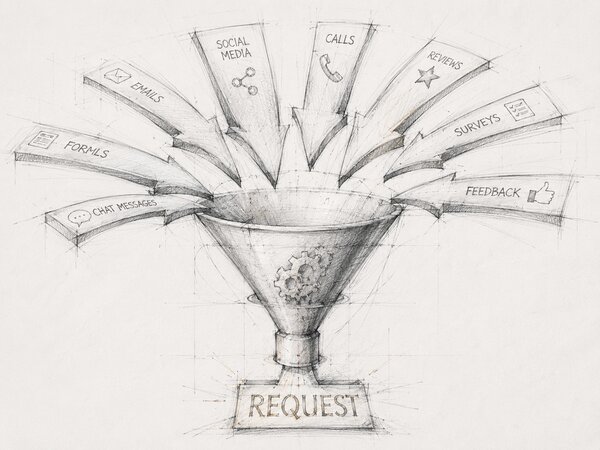
A brief and an intake form are the same document pointed in opposite directions. The brief flows from the creative team outward: here is what we’re going to make, here is who it’s for, here is how we’ll know it’s done. The intake form flows inward: what I need, why I need it, and what I already know about the constraints. The fields overlap almost entirely — objective, audience, deliverable, deadline, budget, mandatories. What changes is who fills them in.
That inversion is the whole design problem. The requester is, by definition, the wrong person to write a brief. They don’t think in deliverables, they don’t know your production constraints, and a fair number of them can’t tell a social cut-down from a hero asset.
But they’re the only person who holds the facts the creative team can’t guess: the real reason there’s a deadline, the actual budget ceiling, the executive who will quietly veto anything in the wrong shade of blue. A good intake form asks for those facts and nothing that needs a creative-ops vocabulary to answer.
The companion to this piece is our creative brief template — the outward-facing version, the one the creative team writes. Read them together and the symmetry is hard to miss: every field the brief needs filled is a field the intake form should be collecting. If your brief asks for the primary call to action and your intake form doesn’t, you’ve just signed up to ask that question by hand on every single request.
What Fields the Form Should Have#
The temptation with any intake form is to make it exhaustive — every field you might ever want, so you never have to follow up. It’s the wrong instinct. Baymard’s checkout research(opens in new tab) is the cleanest illustration: in 2024 the average e-commerce checkout collected 11.3 form fields when most need only about 8, and the number of fields a person has to consider hurts usability far more than the number of steps they click through. Checkout isn’t creative intake, but the principle transfers directly — every field you add is a field you commit to reading on every submission, and a field the requester can stall on. Ask for what you’ll act on; collect the rest on the kickoff call.
Here’s a schema worth starting from. Twelve fields, most of them required, sized so a requester can finish in one sitting.
| Field | What it captures | Required? |
|---|---|---|
| Your name | Who is asking. Becomes the contact record on the receiving side. | Required |
| Your email | The address the team replies to — and, on a verified form, the one that proves the request is real. | Required |
| Request title | A one-line name for the work, in the requester’s words. “Q3 sale banner set,” not “design request #47.” | Required |
| What are you trying to achieve? | The objective, stated as an outcome rather than a deliverable. “Drive webinar signups,” not “make a banner.” | Required |
| Who is it for, and where will it run? | Audience plus channel. The same message is a different asset on Instagram, in an email, and on a billboard. | Required |
| What do you need made? | The deliverable list — with an explicit “I’m not sure yet, let’s talk” option so the form doesn’t force a guess. | Required |
| When do you need it — and why that date? | The deadline and the driver behind it. A date with no reason is a wish; a date tied to an event is a constraint. | Required |
| Budget or scope ceiling | A range or a cap. The number that lets triage say “not at that scope” up front, before anyone scopes the work. | Recommended |
| Brand and reference links | Brand kit, two examples of what they like, one of what they don’t. Saves an entire revision round. | Recommended |
| Who signs off? | The single person who can approve the final work. If the requester can’t name them, that’s a triage signal. | Recommended |
| Supporting files | Existing assets, source files, the rough sketch. Optional — but it’s where the real brief often hides. | Optional |
| Consent to store your details | A short notice and checkbox covering the personal data the form collects. Required wherever data-protection law applies. | Conditional |
Three of these are where intake forms usually go wrong.
The deliverable field needs an escape hatch. The fastest way to get a useless answer is to force a requester to spec a deliverable they don’t understand. Offer a short list of the work you actually do, plus an explicit “I’m not sure yet — let’s talk” option. A request that honestly says “I don’t know what I need, I just know the goal” is more useful than one where someone guessed “a banner” and the goal needed a landing page.
The deadline field should ask why. A date with no driver behind it is a wish; a date tied to an event is a constraint you can plan against. “June 30” tells you nothing. “June 30, because the campaign goes live July 1 and legal needs two days” tells you what’s actually fixed and what has give. Ask for both the date and the reason in the same field.
The sign-off field saves the most rework. Name the single person who can approve the final work. Most stalled projects aren’t stuck on the craft; they’re stuck waiting for an approval nobody scoped. If the requester can’t name who signs off, that’s not a missing field — it’s a triage signal that the request isn’t ready, and you’ve learned it before opening a single file.
Triage: Accept, Clarify, Decline#
A form that auto-converts every submission into a project is just a faster way to over-commit. Between “received” and “in the queue” sits a human decision, and it has three outcomes.
Accept. The fields are complete, the scope is clear, the deadline is real, and the budget matches the ask. The request moves into the work queue and someone owns it. This is the path a good form is designed to make common — most of the work of triage is done by the form, before a reviewer ever looks.
Clarify. The request is plausible but underspecified — no sign-off named, a deadline with no driver, a deliverable left blank. Rather than reject it or accept it blind, you send one targeted follow-up for the missing answers. The discipline here is to ask once, completely, rather than drip a question a day. A request in “clarify” is paused on the requester, not on you.
Decline. Out of scope, no budget, or a deadline that isn’t physically possible. The kindest thing you can do is say no on day one, with a reason and an alternative if you have one (“we can’t shoot original photography by Friday, but here are three stock options”). Teams that can’t decline at intake end up declining at delivery, which is the same no, weeks later, with a missed deadline attached. A decline should always carry its reason — both as a courtesy and so the next similar request gets routed faster.
How YetOnePro handles this: in Intake Forms, every submission lands in a Requests inbox as a request with a short lifecycle — new, in review, then approved or rejected — filterable by form, status, and assignee. Rejecting requires a reason, and approving can be a plain acknowledgement or can carry the request into the rest of the system.
From Intake Form to the Rest of the System#
Here is the part most intake-form templates leave out, and it’s the part that decides whether the form was worth building. A form that emails the answers to a shared inbox is a prettier version of the Slack message it replaced — someone still has to read it, retype the details into the project tool, create the client’s contact record, and file the attachments. The form saved the requester a little structure and saved the team nothing.
The value is auto-creation. When the requester clicks submit, the submission should become a structured record the team can act on without transcribing it — and the answers that map cleanly onto things you already track should flow into them — the email field becomes a contact, the company name a company, the brief answers the brief itself.
How YetOnePro handles this: a workspace member building a form maps individual fields to contact details at build time — this email field becomes the contact’s primary address, this text field becomes the company name. On approval, the request auto-creates the contact (and, optionally, the company), and the email the requester verified during submission becomes that contact’s primary address — so the person who sent the request is already in your system, already reachable, the moment you say yes. Approve the same request twice and you still get one contact, not two.
That contact is the hook everything else hangs from. Today, approval creates the person; the project that person’s work belongs to is the next piece on the roadmap. Intake is built so that when Projects ships, the same approval moment can spin up a project without changing the form — the request already carries everything a project needs to start.
Creative Ops Roadmap
Contacts
A people-aware record of every client, reviewer, approver, freelancer, and agency partner who touches the work. Powers portals, watermarks, share links, and approvals.
Intake Forms
Branded request intake — clients submit briefs through a workspace-scoped form that lands in a Requests inbox, ready to triage and auto-create the contact on approval.
Projects
A project is not a folder — it groups assets, briefs, contacts, approvals, and timelines under one identifier with its own lifecycle.
Approval Workflows
Routed sign-offs across stakeholders and rounds, with an audit trail that explains exactly who approved what, when, and on which version.
Custom Workflows
Build the operational flow your team actually uses — triggers, conditions, actions, and integrations spanning the rest of the Creative Ops layer.
The order matters. Contacts before intake, because a request from a stranger is less useful than a request that lands as a named relationship. Intake before projects, because a project with no front door fills up by hand. Each piece plugs into the one before it, and shipping them out of sequence would leave half the operational picture without a home. The whole layer ships under our honest pricing — no per-seat surcharge for the front door to your own work.
Intake Patterns That Survive Volume#
A single form works until the variety of requests outgrows it. A photoshoot booking, a quick social edit, and a full brand-identity project don’t want the same fields, and forcing them through one schema produces a form that’s too long for the simple asks and too shallow for the complex ones. Three patterns handle the growth.
One smart form, branched by type. The form opens by asking what kind of work this is, then shows the fields that request type needs and hides the rest. The requester only ever sees a short form, while the team still gets the right schema for each request type. It keeps a single entry point, which is the thing requesters actually remember.
One form per team. A marketing-ops form, a design-ops form, a video-ops form — each owned by the lead who triages it, each with its own fields and its own queue. This works when the teams are genuinely separate and the requesters know which door to knock on. It fragments the entry point, so it’s the wrong call if half your requests come in mis-routed.
Templates for the requests you get constantly. “Change the date on the flyer” doesn’t need a discovery form. Frequent, well-understood request types get a ready-made form with most of the answers pre-filled, so the requester confirms rather than composes. Intake Forms ships with a starter set of these — think creative brief intake, photoshoot booking, brand asset request, vendor onboarding — that a workspace clones and edits rather than starting from a blank page.
Volume brings two problems a private brief never had, because the form is now a public URL anyone can reach.
Bots find public forms. An open submit endpoint will be hammered by automated junk, and every spam submission is one a human has to triage. The defense is layered: a bot-protection check such as Cloudflare Turnstile(opens in new tab) (a privacy-preserving CAPTCHA alternative), a verified-email gate so a submission has to come from a real, confirmed address, and a per-IP rate limit so no single source can flood the inbox. We use all three, fail-closed — if the bot check can’t confirm a human, the submission doesn’t go through.
Intake collects personal data. A name, an email, sometimes a phone number — that’s personal data, and collecting it puts you under data-protection law. Under the GDPR you need a lawful basis(opens in new tab) to process it (for B2B request intake, usually legitimate interest or the run-up to a contract), and the form should carry a short, plain privacy notice saying who’s collecting the data and why.
The team running the form is the data controller. A good intake feature gives them the controls to honor an erasure request rather than making them email support. Build the consent line into the form from the start — retrofitting it across a quarter of stored submissions is the kind of cleanup nobody volunteers for.
Start With the Questions, Not the Tool#
If you’re standing up intake for the first time, the form is the cheap part. Three decisions, made before you open any software, are what make it work.
First, write the questions against your brief. Pull up the brief template your team already works from and, for every field it needs answered, decide whether the requester can answer it or whether it’s the creative team’s job. The requester-answerable ones are your intake form. If you don’t have a brief template yet, that’s the thing to build first — the form is downstream of it.
Second, decide where each answer goes. An intake field is only worth collecting if you know what it becomes — a contact detail, a project field, a line in the brief, a tag for routing. A field that maps to nothing is a field you’re collecting out of habit; cut it. This mapping is also what turns the form from a message into automation: the clearer you are about where an answer lands, the more of the post-submission work the system can do for you.
Third, write your accept / clarify / decline criteria down before the first request arrives. What makes a request ready? What’s an automatic no? Who’s allowed to decline? Triage made up on the spot drifts toward “accept everything,” which is how a tidy intake form still ends up feeding an overcommitted team. The form filters structure; the criteria filter work.
Do those three things and the request stops bouncing. The brief arrives complete, the triage decision is made on real information, and the answers flow into the people, projects, and files the work actually runs on. The form is the visible part — the discipline behind it is the part that pays.
Frequently Asked Questions #
How is an intake form different from a creative brief?
How many fields is too many?
Should the intake form be public or behind a login?
What stops bots and spam on a public intake form?
Do we need consent and GDPR handling for an intake form?
How does an intake form connect to contacts and projects?